Choosing a JuiceSSH alternative
For mobile SSH with conversational command help and built-in Tailscale, consider TermAI. For a shared host list across desktop and mobile, consider Termius. For a free open-source Android SSH client, consider ConnectBot. Keep your existing server access while trying any replacement.
This guide is maintained by the TermAI team. The September 30, 2026 update checks Termius plan details against its official pricing page and clarifies installation, maintenance and migration. The screenshots illustrate TermAI; they are not a controlled benchmark of competing clients.
Installation, continued operation and maintenance are separate checks
An existing JuiceSSH installation working today does not establish whether you can reinstall it or whether its developer will ship another update. Check the official Google Play listing using your own device and account before resetting or replacing your phone. We do not have an official developer statement establishing a permanent end of support or the reason for a listing change.
- New installation: confirm availability for your account, region and device rather than relying on another user's result.
- Existing installation: test access and purchase restoration separately. Keep another login method available before changing anything.
- Maintenance: consult developer releases and announcements. The ability to launch an app is not evidence of continued maintenance or a security assessment.
If reliable recovery matters to you, prepare a replacement before you need it. Do not uninstall your only working client or revoke the old key until a new independent session has succeeded.
Android SSH clients compared (2026)
| Client | Status | AI | Tailscale | SFTP | Price (2026) |
|---|---|---|---|---|---|
| TermAI | ✅ Active | ✅ built in | ✅ built in | ✅ | Free tier; Pro $2.99/mo; Team $7.99/seat/mo |
| Termius | ✅ Active | ✅ autocomplete on free tier | ❌ | ✅ | Free Starter; Pro $10/user/mo billed annually |
| ConnectBot | ✅ Active (1.10.x shipped in 2026) | ❌ | ❌ | ❌ | Free, open source |
| Termux | ✅ Active (F-Droid/GitHub; Play build deprecated) | ❌ | ❌ | n/a — local shell | Free, open source |
| JuiceSSH | Verify current availability | Check vendor information | Check required features | Existing installation | Check official store |
Termius Pro's $10/user/month is the annual-billing rate (~$120/year); month-to-month costs meaningfully more. Termux is listed because it appears in every JuiceSSH-alternative roundup, but it isn't an SSH client — see below.
1. TermAI — the closest direct replacement
If what you valued about JuiceSSH was "open the app, tap a saved host, be in a shell in two seconds", TermAI is the nearest thing still being built. It's phone-first rather than a desktop product squeezed onto a phone: saved hosts, private-key import into the Android keystore behind biometric unlock, a persistent Esc/Ctrl/Tab/arrow key row, SFTP, and sessions that reconnect instead of dying when you switch apps.
Two parts of the TermAI workflow are: Tailscale built in, so you reach a home server or a firewalled VPS without exposing port 22 or running a second VPN app, and an AI assistant inside the terminal. The free tier is unlimited SSH and SFTP plus 5 AI requests a day; Pro is $2.99/month, Team $7.99/seat/month — noticeably below Termius Pro.
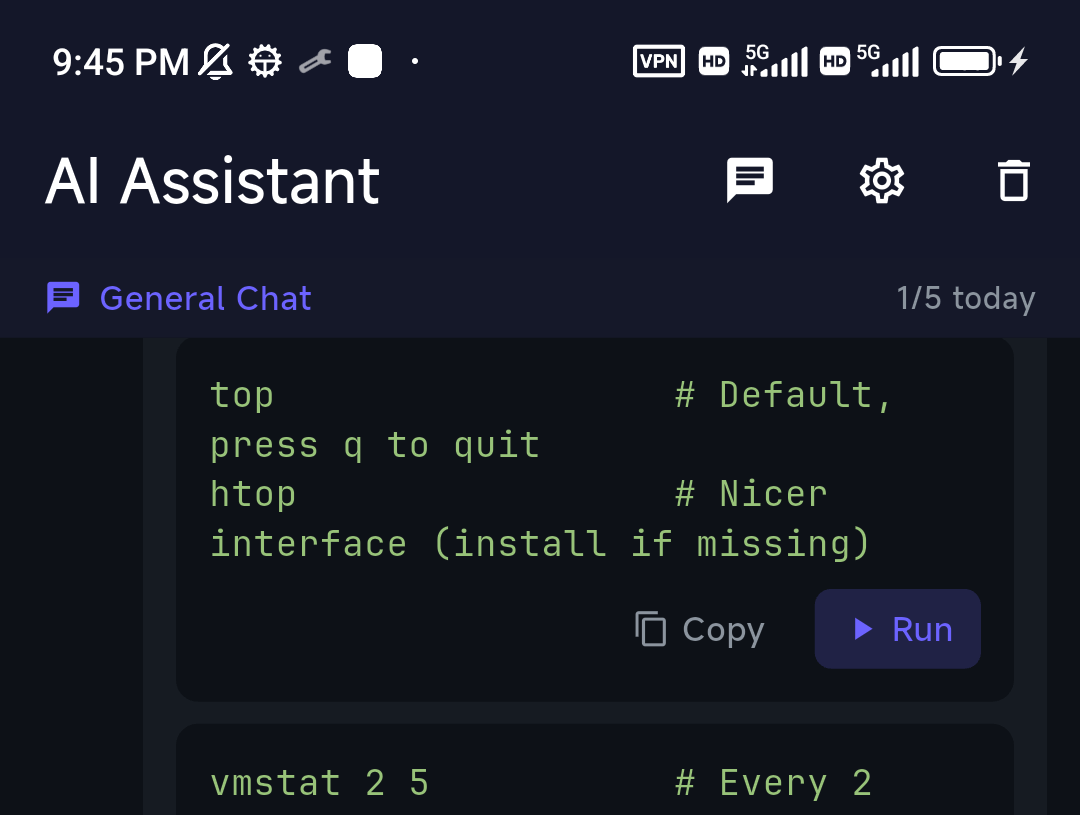
The design choice worth knowing about is that the assistant is suggest-and-confirm by default, not an agent that runs things for you: it writes the journalctl incantation onto your input line and waits, and destructive commands take an extra confirmation. On a 6-inch screen at 2am against production, that's the right default — we argued it out in letting AI run shell commands on mobile, safely.
Best for: JuiceSSH users who want active development, SFTP, and AI without jumping to a $10/month plan.
Trade-off: it's a subscription, not a one-time purchase, and it's mobile-only — there's no desktop client, so if you want one host list shared with a laptop, that's Termius's job.
2–3. Termius and ConnectBot
Termius — the cross-platform pick
Termius is the mature choice and the one to take if you bounce between a phone and a laptop: hosts, keys, and snippets sync across Android, iOS, Windows, macOS, and Linux, which no phone-first client can match. The 2026 pricing picture is better than its reputation: the free Starter plan includes SSH, SFTP, port forwarding, AI autocomplete, and a local vault — what it withholds is synchronization, so on the free plan your hosts and keys live on one device only. Pro is $10/user/month billed annually, with Team and Business above it. On Android alone, free Termius is a capable client; you're paying for the laptop half. Direct comparison in Termius vs JuiceSSH.
Best for: one host list across phone and desktop, or a team with shared hosts.
Trade-off: sync needs an account and a subscription, and the mobile app carries the weight of a desktop-first product.
ConnectBot — free, open source, no account
ConnectBot is the answer if the thing you liked about JuiceSSH was that it didn't want anything from you. Free, open source, no tiers, no account, no cloud — and, contrary to its dusty reputation, still being released: the 1.10.x line shipped through 2026, which is more than most apps in this category can say. It's available on Google Play and F-Droid.
The honest limitation is file transfer: ConnectBot does SSH sessions, tunnels, and agent forwarding, but not SFTP. "Edit a config file from my phone" means nano over the session rather than pulling the file down. The UI also looks its age. If neither bothers you, it's the lowest-commitment option on this page. See Termius vs ConnectBot for the head-to-head.
Best for: minimalists and privacy-first users who want zero accounts.
Trade-off: no SFTP, no sync, no AI, dated interface.
Termux is not a JuiceSSH alternative
Termux shows up in every "JuiceSSH alternative" list, so it's worth being precise: it's a local Linux environment on your phone, not a connection manager. You can pkg install openssh and run ssh user@host inside it, but there's no saved-host list, no key manager, no tap-to-connect, and no touch-friendly key row. It's excellent at what it is — rsync, tmux, git, Python, on-device — and it's also the standard way to run an SSH server on Android (sshd listens on port 8022, since Termux can't bind a privileged port). Install it from F-Droid or GitHub; follow the official Termux installation guidance for your distribution; do not mix app and plugin packages from differently signed sources. More in Termius vs Termux and running Linux on Android.
Alternatives you'll see recommended that you can't actually use
Roundups mix platforms constantly. To save you a Play Store search that goes nowhere:
- Blink Shell and Prompt — iOS and iPadOS only, no Android build. (Blink vs Termius.)
- PuTTY — a Windows desktop program. There is no official PuTTY for Android; the "PuTTY" apps on Play are unrelated third-party repackages, which is a bad thing to trust with SSH keys. Use a native client and convert your
.ppkto OpenSSH format. (PuTTY for Android.) - "Server Auditor" — just Termius's old name; you'll still see it in older articles.
- The JuiceSSH plugins — the Tasker plugin, PortKnocker, and the performance monitor are separate apps from the same developer. Check each store listing's last-update date before assuming it will keep working, and plan replacements for any plugins you rely on.
What if I want a one-time purchase like JuiceSSH Pro was?
A one-time purchase and ongoing maintenance are different questions. Compare the current purchase terms, included functions and recovery options for each client. ConnectBot is an open-source option for users who only need its supported SSH workflow; verify file-management and synchronization requirements separately.
Migrating from JuiceSSH
The trap is getting halfway through and finding yourself locked out of a VPS you can only reach from your phone. Do it in this order, and do the early steps while the app definitely still opens.
- Inventory everything. Write down every connection: hostname or IP, port, username, auth method, and any jump host or port-knock it needs.
- Install the replacement alongside JuiceSSH. Don't uninstall anything yet. Two SSH clients on one phone is fine.
- Generate new keys in the new client — don't try to export the old ones. JuiceSSH keeps identities in its own encrypted database with no clean private-key export, and here the awkward path is also the right one: you get fresh ed25519 keys instead of an RSA key you made in 2016, the key material never sits in a clipboard or a note, and a key that spent years inside an unmaintained app gets retired — which it should be regardless.
- Add the new public key before removing the old one. Append it to
~/.ssh/authorized_keyson each host while your old access still works;ssh-copy-idfrom an existing session is the fast way. - Verify from the new app on a fresh connection. Not a cached session — close it and reopen.
- Only then revoke the old key, removing its line from
authorized_keyseverywhere. Any key you can't account for should come out too. - Now uninstall JuiceSSH.
If a host has provider console access (a DigitalOcean/Hetzner/OVH web console, a Proxmox shell, IPMI), confirm you can get in before step 6. That console is your undo button. There is no import tool that reads a JuiceSSH database into another client, so for a large host list, budget the time to re-enter and re-group — the full walkthrough is in migrating off JuiceSSH safely.
How to choose
- Want the closest feel to JuiceSSH, actively developed, with SFTP and AI → TermAI ($2.99/mo Pro, free tier to try it).
- Use a laptop or iPhone too and want one synced host list → Termius.
- Want free, open source, no account, and don't need SFTP → ConnectBot.
- Want free but also need file transfer → TermAI's free tier or Termius Starter.
- Reaching a home server or a box behind NAT → a client with Tailscale built in.
- Want a Linux shell on the phone itself → Termux from F-Droid (not an SSH client).
- Coming from Windows and PuTTY → there's no Android PuTTY; TermAI or ConnectBot.
- Thinking about staying on JuiceSSH → don't. It can't be reinstalled, Pro may already be gone, and it will never be patched again.
Sources and a practical check before switching
Termius plan details were checked on September 30, 2026 against its official pricing page. Other useful primary sources are ConnectBot, Blink Shell and Prompt. Store prices and offers depend on region and billing period. TermAI is our product; its screenshots illustrate the interface, not a controlled comparative benchmark.
TermAI includes 5 AI requests per day in the free tier. Paid plans provide monthly AI token allowances, shown in the app. Cloud sync is paid and excludes passwords and private keys. Review the current plan details and AI data-handling information before choosing a workflow.
For your own acceptance check, use a non-production host and record the phone OS, app version and authentication method. Verify the host fingerprint through a trusted server console, open a fresh session, test the special keys and any required file transfer, then check reconnection after a network change. Record what happened rather than assuming another device behaves identically. Keep the old client and a recovery login until the new setup works.
FAQ
Is JuiceSSH dead?
Verify installation, purchase restoration and maintenance information using the official store and developer sources. Keep your existing server access while testing a replacement; a working old installation does not establish future support.
What happened to JuiceSSH?
Sonelli Ltd stopped shipping updates after February 2021. Google Play requires apps to keep targeting a recent Android API level; four years of silence made that impossible, so the listing was pulled in December 2025. It was a compliance removal, not a takedown for malware. Separately, the Pro licence check stopped recognising old purchases around the same time.
Can I still download JuiceSSH?
Check the official listing on your device and account. Installation, purchase restoration and ongoing maintenance are separate questions; keep a working access path before migrating.
Does JuiceSSH still work on Android 15 and 16?
An existing install generally still launches and connects, since Android doesn't remove apps whose listings are pulled. What you're relying on is a binary targeting 2021-era APIs on a platform that has changed its storage, background, permission, and keystore behaviour several times since. The first Android change that breaks it will not be fixed, because nobody is left to fix it.
Why did my JuiceSSH Pro features stop working?
Check the purchase history and restoration flow for the account that bought it, then contact the official developer or store support. We cannot establish the cause of an individual failure from community reports, and do not assume a new purchase will fix it.
Is it safe to sideload the JuiceSSH APK or a patched build?
No — and specifically because of what this app is. You'd be giving a 2021 binary with 2021 crypto, from a mirror or an anonymous patcher, the private keys to every server you own. A compromised SSH client leaks your entire infrastructure, not a photo library.
What's the best JuiceSSH alternative?
TermAI is the closest direct replacement on Android — same tap-a-host-and-go feel, plus SFTP, built-in Tailscale, and an AI assistant, at $2.99/month with a free tier. Termius if you need desktop sync. ConnectBot if you want free and open source. All three are actively maintained, unlike JuiceSSH.
What's the best free JuiceSSH alternative?
ConnectBot is fully free and open source with no tiers and no account, and it's still shipping releases in 2026 — but it has no SFTP. If you need file transfer without paying, TermAI's free tier (unlimited SSH and SFTP, 5 AI requests a day) and Termius's free Starter plan both include it; Termius's paywall is sync, not the client.
Is there an open-source JuiceSSH alternative?
Yes — ConnectBot is the open-source Android SSH client, and Termux is the open-source local Linux environment if you'd rather run ssh yourself. JuiceSSH itself was never open source, which is why its shutdown left nothing behind: no final Pro-unlocked build, no source release.
Is Termux a good JuiceSSH replacement?
Not for the same job. Termux is a Linux shell on the phone, not a connection manager — no saved hosts, no key manager, no tap-to-connect, no key row for Esc and Ctrl. Use it when you want Linux tools on-device; use an SSH client when you want to manage remote servers. Install from F-Droid or GitHub, since the Play build is deprecated.
Can I import my JuiceSSH connections or keys into another app?
No. JuiceSSH stores identities in its own encrypted database with no clean export, and no other client can read it. Re-add the hosts by hand and generate fresh keys in the new app rather than trying to rescue the old ones — see the migration steps for the order that avoids locking yourself out.
Is there a JuiceSSH alternative for iPhone or desktop?
JuiceSSH was Android-only, so there was never an iOS or desktop version to replace directly. On iPhone and iPad, TermAI, Termius, Blink Shell, and Prompt are the maintained options (iPhone roundup). For desktop plus mobile with a shared host list, Termius is the practical pick — or see the best SSH client in 2026.
Is JuiceSSH Pro worth buying in 2026?
Verify installation, purchase restoration and maintenance information using the official store and developer sources. Keep your existing server access while testing a replacement; a working old installation does not establish future support.
What about the JuiceSSH plugins — Tasker, PortKnocker, the performance monitor?
They're separate apps from the same developer and equally dormant. Check each listing's last-update date before depending on it, and plan a replacement for anything load-bearing in your workflow.
How do I avoid picking the next abandonware?
Check official release history, documented platform support, recovery options and how to contact the developer. None guarantees future maintenance. Keep a separate recovery path and test it before depending on a single client.
Quick Facts
- Topic: is JuiceSSH dead, and the best alternatives for Android in 2026
- JuiceSSH: verify installation and maintenance information; keep access while testing a replacement.
- Scale before removal: ~3.9M downloads, ~4.06 stars across ~52,000 ratings
- Pro licence: purchases made before December 2025 reported as no longer validating; support unresponsive
- Closest replacement: TermAI — SFTP, built-in Tailscale, AI assistant; free tier, Pro $2.99/month
- Cross-platform option: Termius (free Starter; Pro $10/user/mo billed annually, sync is the paywall)
- Free & open source: ConnectBot (no SFTP; 1.10.x releases shipped in 2026)
- Not an SSH client: Termux — a local Linux environment; install from F-Droid or GitHub
- Sideloading the APK: not advised — a 2021 binary from an unverified source holding your server keys
- Migration: no export from JuiceSSH; re-add hosts, generate new keys, add before revoking
Free on iOS and Android. 5 AI requests/day on the free tier, plus unlimited SSH/SFTP and built-in Tailscale.