The short answer
Warp is an excellent AI terminal — and in 2026 it's a different product than most "Warp alternative" articles describe. Two of the old complaints are gone: Warp no longer forces you to log in (that changed in November 2024) and the terminal client is now open source (AGPL-3.0, since April 2026). So pick your alternative for a reason that's still true today:
- You want an AI terminal on your phone → TermAI. This is the one gap Warp still doesn't fill — there is no Warp app for iOS or Android.
- You want a free, open-source terminal with AI and your own API key → Wave Terminal (Apache-2.0, no credits, bring your own model).
- You just want a fast, lean terminal on a Mac → Ghostty (MIT, native, no telemetry) or iTerm2.
- You want AI that does the work, not just suggests it → an agentic CLI like Claude Code or aider.
- You want SSH with saved hosts and keys → a real SSH client, not a terminal emulator. Warp isn't one.
The rest of this page covers each of those in detail, including what's free, what's open source, what runs on a Mac, and what's genuinely "Warp-like."
What changed in 2026 (most articles get this wrong)
If you're reading a Warp comparison written before mid-2026, two of its main arguments are out of date. Worth knowing before you switch off Warp for a reason that no longer applies:
- Warp is open source now. On April 28, 2026, Warp open-sourced its terminal client under AGPL-3.0 (its UI framework is MIT), and rebranded itself an "agentic development environment." OpenAI signed on as a founding sponsor. So "Warp is closed source" is no longer a reason to leave.
- Warp doesn't require an account. Warp lifted the login requirement on November 22, 2024. You can download it and use the core terminal without signing up — though some cloud and AI features are still gated behind an account.
- What's still proprietary: the client is open, but Warp's cloud side — Oz, its agent-orchestration platform — remains closed. If your objection is "my sessions and prompts shouldn't touch a vendor's cloud," that objection survives; open-sourcing the client didn't change it.
- What still doesn't exist: a Warp mobile app. See the mobile section — this remains the single largest hole in Warp's coverage.
Note also that AGPL-3.0 is strong copyleft. For most individuals that's irrelevant, but if you plan to fork and redistribute Warp — or offer it over a network — you inherit obligations that MIT-licensed options like Ghostty or Apache-2.0 options like Wave Terminal don't impose.
Warp alternatives at a glance
| Tool | Platform | AI | License | Price |
|---|---|---|---|---|
| TermAI | iOS + Android | ✅ in terminal | Proprietary | Free tier; Pro $2.99/mo |
| Wave Terminal | Mac/Linux/Win | ✅ bring your own key | Apache-2.0 | Free |
| Ghostty | Mac/Linux | ❌ | MIT | Free |
| Kitty | Mac/Linux/BSD | ❌ | GPLv3 | Free |
| WezTerm | Mac/Linux/Win | ❌ | MIT | Free |
| Alacritty | Mac/Linux/Win | ❌ | Apache-2.0 | Free |
| Tabby | Mac/Linux/Win | ❌ | MIT | Free |
| iTerm2 | macOS only | ❌ (plugin) | GPLv2 | Free |
| Warp | Mac/Linux/Win | ✅ built-in | AGPL-3.0 (client) | Free tier; paid plans |
The thing people most often want that Warp still doesn't offer is a mobile version — none exists. TermAI covers that. For everything else, the open-source desktop field is unusually strong in 2026.
Why people look for a Warp alternative
Filtering out the reasons that are no longer true, here's what actually drives the search in 2026:
- No mobile app. Warp runs on macOS, Linux, and Windows — there's nothing for iOS or Android. This is the most common reason, and the one with no workaround inside Warp itself.
- AI usage is metered. Warp's AI runs on a credit system, and the free allowance is modest. If you use AI heavily, you either pay or you pick a tool where you bring your own API key and pay the model provider directly.
- The cloud side is still closed. Open-sourcing the client didn't open Oz. Privacy-sensitive users who don't want prompts or session data leaving the machine still want a local-AI or no-AI option.
- You want SSH, not a terminal emulator. Warp has no saved-host list and no key manager. See below.
- You just want a fast terminal. Sometimes you don't need AI at all — you want a lean, instant-start terminal. Ghostty and Alacritty start faster and use less memory than a feature-heavy AI terminal.
- Copyleft. AGPL-3.0 is fine to use, but it's a constraint if you intend to fork and ship.
What makes a terminal "Warp-like"?
People searching for a "terminal like Warp" usually aren't asking for a terminal emulator in general — they want a specific set of modern features that Warp popularized. Those are:
- Blocks. Each command and its output grouped into a discrete, selectable, shareable unit instead of one endless scrollback.
- A real text editor at the prompt. Cursor movement, selection, and multi-line editing that behave like a normal input box rather than readline.
- AI in the terminal. Describe what you want, get a command back — without alt-tabbing to a browser.
- A command palette and modern UI. Searchable actions, themes, and a GUI that doesn't feel like 1995.
Which alternatives are genuinely Warp-like by that definition:
- Wave Terminal — the closest match on the desktop. Command blocks, built-in AI, modern UI, open source. If "terminal like Warp" is your search, start here.
- TermAI — the closest match on a phone: AI in the terminal with tap-to-run commands, which no desktop terminal gives you on mobile.
- Ghostty / Kitty / WezTerm — modern and fast, but deliberately not Warp-like: no blocks, no AI, no GUI chrome. Great terminals, different philosophy.
- Tabby — modern GUI and very customizable, but no blocks and no built-in AI.
If blocks specifically are what you're after and you don't want to leave your current terminal, note that they're a UI feature, not a shell feature — no plugin retrofits them onto Alacritty or Ghostty.
Free Warp alternatives
Warp itself has a free tier, but the AI on it is credit-limited. If "free" is the priority, these cost nothing at all and don't meter your usage:
- Wave Terminal — completely free and open source. AI included, but you supply an API key (OpenAI, Claude, or Gemini) or point it at a local model via Ollama or LM Studio. That means no credit limits: you pay the model provider directly, or nothing at all if you run local.
- Ghostty, Kitty, WezTerm, Alacritty, Tabby — all free, all open source, no accounts, no metering. No built-in AI.
- iTerm2 — free on macOS, and the long-standing default for Mac users who want more than Terminal.app.
- TermAI — has a free tier on mobile; Pro is $2.99/mo.
The catch to watch for: "free terminal with AI" almost always means one of two things — free client with metered AI credits (Warp), or free client where you bring and pay for your own model (Wave, and most agentic CLIs). Genuinely free AI usually means running a local model, which is private and unmetered but noticeably weaker than a frontier model.
Open-source Warp alternatives
This is the section that changed most in 2026. Warp's terminal client is itself open source now (AGPL-3.0, April 2026), so if open source was your only objection, you may not need an alternative at all. If you still want one — because you want a permissive license, or because you don't want the proprietary cloud side — these are fully open:
- Wave Terminal (Apache-2.0) — the closest open-source equivalent to what Warp does: modern terminal, command blocks, built-in AI with your own key, and no proprietary cloud in the middle. Version 0.14 added durable SSH sessions that survive network drops and reconnect automatically, plus a graphical editor for remote files. Actively developed.
- Ghostty (MIT) — GPU-accelerated, written in Zig, no VC money, no ads, no telemetry. Since December 2025 it's under Hack Club's 501(c)(3) as fiscal sponsor, which is a real signal about its long-term independence.
- WezTerm (MIT) — configured in Lua, with built-in multiplexing (panes, tabs, remote domains). The most capable option if you want one tool that does everything, everywhere.
- Alacritty (Apache-2.0) — the minimalist. No tabs, no splits, no multiplexing by design; pair it with tmux.
- Kitty (GPLv3) — GPU-accelerated and feature-rich, with its own graphics and kitten plugin protocols.
- Tabby (MIT) — the most customizable GUI terminal, with a plugin ecosystem. It's Electron-based, so it uses more memory and has more input latency than the native options above.
License note if it matters to you: Warp's client is AGPL-3.0 (strong copyleft — network use triggers source obligations), Kitty is GPLv3, iTerm2 is GPLv2, while Ghostty, WezTerm, and Tabby are MIT and Wave and Alacritty are Apache-2.0. For personal use any of these is fine; the distinction only bites if you fork and redistribute.
Warp alternatives for Mac
Warp started as a Mac-first app, so most people searching for a Mac alternative want the same polish without the AI metering or the cloud. On macOS specifically:
- Ghostty — the strongest default for most Mac users in 2026. Native macOS UI, GPU-accelerated, near-instant startup, sensible defaults so it works well before you configure anything. MIT-licensed and telemetry-free.
- iTerm2 — the veteran. Split panes, search, triggers, profiles, and a decade of accumulated features. Heavier than Ghostty and the UI shows its age, but nothing beats it on sheer feature depth.
- Kitty — if you want GPU speed plus scriptability and don't mind configuring a text file.
- WezTerm — best pick if you also use Linux or Windows and want one identical config across all three.
- Alacritty — if you already live in tmux and want the fastest, most boring possible window around it.
- Wave Terminal — if you want to keep an AI assistant in the terminal on your Mac without the credit system.
- Terminal.app — worth remembering that macOS ships a perfectly usable terminal. If Warp felt like too much, the built-in one may be enough.
Note that Apple Silicon builds are standard across all of these now — none of them require Rosetta.
Is Warp an SSH client?
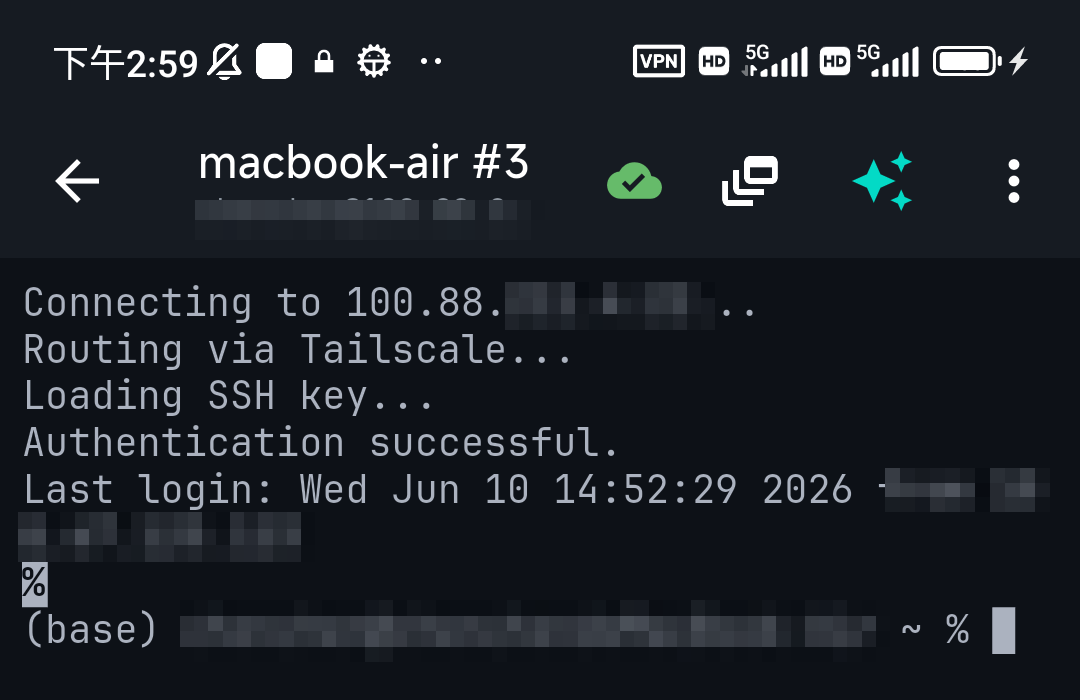
Not really — and this trips up a lot of "warp ssh client" searches. Warp is a terminal emulator: you can type ssh user@host inside it just like any terminal, but it has no saved-host list, no key manager, and no tap-to-connect. It's built for working on your local machine, not for managing a set of remote servers. If SSH is the main thing you want — especially from a phone — you want a purpose-built SSH client. On mobile that's TermAI (saved hosts, on-device keys, built-in Tailscale, plus the same in-terminal AI); on the desktop, pair a terminal like Ghostty or Tabby with OpenSSH and an ~/.ssh/config, or use a dedicated SSH client.
One genuinely useful middle ground: Wave Terminal's durable SSH sessions reconnect automatically after a network drop, which is the closest a desktop terminal gets to SSH-client behavior without being one.
If you want AI in a terminal on your phone → TermAI
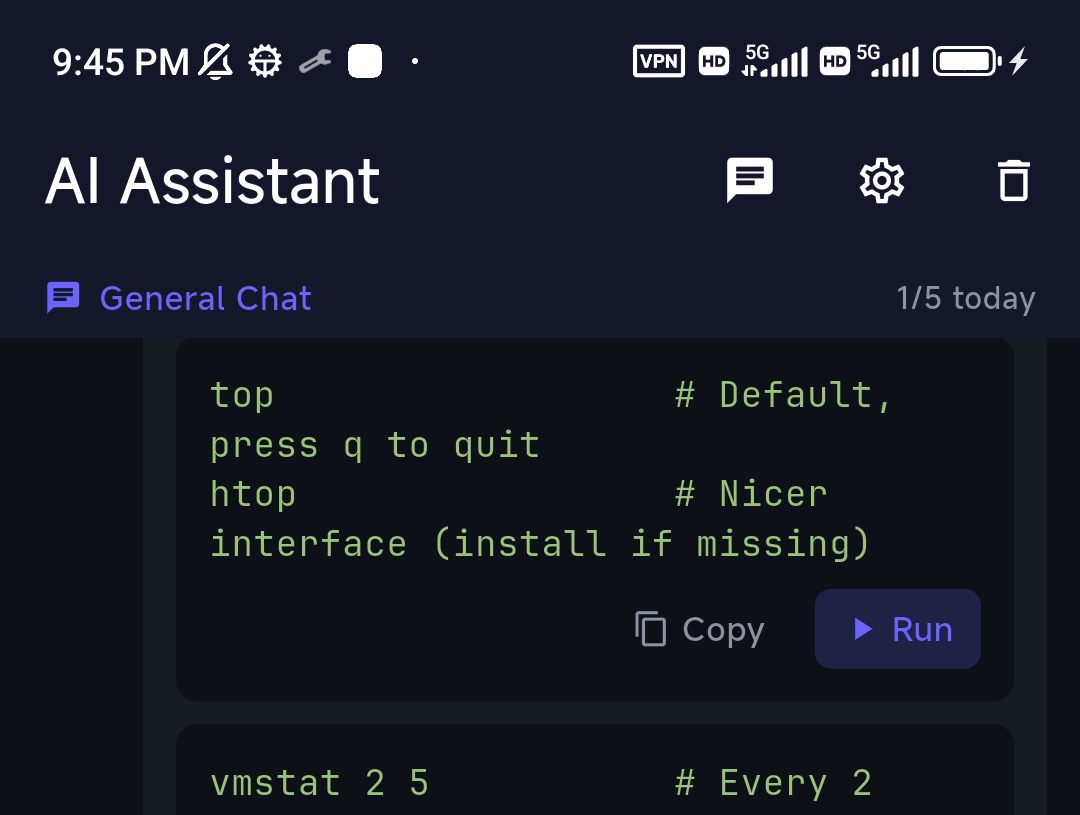
This is the gap Warp doesn't fill at all. TermAI is a mobile SSH client with an AI assistant built into the terminal: describe a task and it suggests the command, grounded in the live server (it reads the OS, the current disk/memory/CPU, and recent output), with a confirmation before anything destructive runs. It also has built-in Tailscale, and it's on both iOS and Android. If "Warp alternative" really means "I want the Warp experience on my phone," this is it.
The workflow that replaces desktop Warp on the go: SSH from TermAI into the same Mac or Linux box where you'd normally open Warp, and let the AI help you there — from your phone, over the network. With built-in Tailscale you can reach that machine even when it's not on the public internet. New to it? The visual getting-started guide walks through the first connection.

What about Warp on the web?
To be fair to Warp, there is a partial mobile story, and it's worth understanding before you decide. Warp's /remote control feature publishes a running agent session to Warp's cloud, and Warp on the web renders in mobile browsers (iOS Safari 15+, Android Chrome 58+, Samsung Internet 7.2+) with touch gestures for scrolling, selection, and context menus. So you can monitor and steer an agent from your phone.
What that is not: a mobile terminal. It requires a desktop Warp session already running somewhere, it routes through Warp's proprietary cloud, and it gives you no saved hosts, no on-device SSH keys, and no way to open a fresh connection to an arbitrary server from your phone. If you want to start a session from the phone — to a VPS, a home server, a Raspberry Pi — you need an actual mobile SSH client.
If you want a free/open-source desktop terminal
- Wave Terminal — the closest open-source Warp equivalent: a modern terminal with built-in AI, free, Apache-2.0, no metering (you bring your own API key, or run Ollama/LM Studio locally). If you like Warp's idea but not the credits, start here.
- Ghostty — fast, native, MIT-licensed, works well out of the box. The best "just give me a great terminal" pick in 2026. See Termius vs Ghostty for how a terminal emulator compares to an SSH client.
- WezTerm — cross-platform, Lua-configured, with built-in multiplexing so you may not need tmux.
- Alacritty — fast and minimal by design: no tabs, no splits, pair with tmux.
- Kitty — GPU-accelerated with a rich feature set and its own plugin ("kitten") system.
- Tabby — free, open-source, highly customizable, cross-platform. No built-in AI, and being Electron-based it's heavier than the native options. See Termius vs Tabby.
- iTerm2 (macOS) — the long-standing free Mac terminal: split panes, search, triggers, and profiles, rock-solid and no AI.
Warp alternatives with AI
If the AI is the specific thing you want to keep, there are three different shapes it comes in — and picking the right shape matters more than picking the right brand:
- AI inside the terminal UI (Warp, Wave Terminal, TermAI) — you describe a task, it suggests a command, you review and run. Best when you want to stay in control and learn the commands. Wave is the desktop open-source version of this; TermAI is the mobile version.
- Agentic CLI (Claude Code, aider) — instead of suggesting commands, these run multi-step tasks in your project: reading files, editing code, running tests, iterating. Better when you want the AI to do the work rather than advise. They're just programs, so they run inside any terminal — Ghostty, Alacritty, iTerm2, whatever you like. This is the combination a lot of people land on: a fast, boring terminal plus a strong agent in it.
- Local AI (Ollama or LM Studio, plus a shell helper or Wave's local-model support) — everything stays on your machine, offline and private, with no credits and no account. The trade-off is a weaker model than a frontier one.
A useful thing to realize: because agentic CLIs are ordinary command-line programs, "an AI terminal" and "a terminal plus AI" are nearly interchangeable on the desktop. The place that isn't true is mobile, where you can't just install a CLI — which is why an app with AI built in matters more there. For the full landscape, see the best AI terminal tools in 2026.
How to pick
- AI terminal on a phone → TermAI (Warp has no mobile app)
- Open-source terminal with AI, no metering → Wave Terminal
- Best all-round Mac terminal → Ghostty (or iTerm2 for maximum features)
- One config across Mac, Linux, and Windows → WezTerm
- Fast & minimal, you already use tmux → Alacritty
- Maximum customization / plugins → Tabby or Kitty
- AI that runs tasks → Claude Code / aider, inside any terminal you like
- Private / offline AI → Ollama or LM Studio, with Wave or a shell helper
- Saved hosts and SSH keys → a real SSH client, not a terminal emulator
FAQ
What is the best Warp terminal alternative?
It depends on what you're replacing. For the same modern-terminal-with-AI experience, free and open source, it's Wave Terminal. For a fast, lean Mac terminal, it's Ghostty. For an AI terminal on a phone — the one thing Warp doesn't do at all — it's TermAI. For AI that does the work rather than suggesting it, an agentic CLI like Claude Code inside any terminal.
Is there an open-source Warp alternative?
Yes, several — though note that Warp itself became open source in April 2026, with its terminal client under AGPL-3.0 and its UI framework under MIT. If you still want an alternative, Wave Terminal (Apache-2.0) is the closest in features, and Ghostty (MIT), WezTerm (MIT), Alacritty (Apache-2.0), Kitty (GPLv3), and Tabby (MIT) are fully open terminals without built-in AI. The one part of Warp that remains proprietary is Oz, its cloud agent-orchestration platform.
Is Warp terminal open source?
The client is, as of April 28, 2026, under AGPL-3.0 (with the UI framework under MIT). The cloud side — Oz — is not. So "Warp is open source" is true of the app on your machine and not true of the service behind it.
What's a free alternative to Warp?
Wave Terminal is free and open source with AI included (you supply an API key, or run a local model via Ollama). Ghostty, Kitty, WezTerm, Alacritty, and Tabby are free with no AI. iTerm2 is free on macOS. TermAI has a free tier on mobile. Warp also has its own free tier, but its AI is limited by a monthly credit allowance.
Is there a terminal like Warp?
Wave Terminal is the closest on the desktop: it has command blocks, a modern UI, and built-in AI, and it's open source. On a phone, TermAI is the closest equivalent. Ghostty, Kitty, and WezTerm are excellent modern terminals but deliberately skip blocks and AI, so they feel quite different from Warp.
Is there a Warp alternative with AI?
Yes. Wave Terminal has AI built in and works with OpenAI, Claude, Gemini, or local models through Ollama and LM Studio. TermAI has AI built into a mobile terminal. And any agentic CLI — Claude Code, aider — brings AI into whatever terminal you already use, which is how many people get AI without switching terminals at all.
What's the best Warp alternative for Mac?
Ghostty for most people: native macOS feel, GPU-accelerated, fast startup, good defaults, MIT-licensed and telemetry-free. iTerm2 if you want maximum features and don't mind a heavier, older-looking app. Wave Terminal if you want to keep AI in the terminal. And macOS's built-in Terminal.app is genuinely fine if Warp felt like overkill.
Does Warp have a mobile app?
No. Warp is desktop-only (macOS, Linux, Windows) — there is no iOS or Android app. You can view and steer a running desktop agent session from a mobile browser via Warp's remote-control feature and Warp on the web, but you can't start a terminal session from your phone that way. For that, use a mobile SSH client such as TermAI.
Can I get Warp on my phone?
Not as an app. The closest is mirroring a desktop session into a mobile browser, which requires a desktop Warp already running and routes through Warp's cloud. To actually open a shell from your phone to a server, use TermAI and SSH into the machine where you'd otherwise run Warp.
Does Warp require an account?
Not anymore. Warp removed the login requirement on November 22, 2024 — you can install it and use the core terminal without signing up, choosing "Skip for now" at the prompt. Some AI and cloud features still require an account. If you want a terminal with no account prompt at all, Ghostty, Alacritty, WezTerm, Kitty, and Tabby never ask.
Is Warp free?
There's a free tier that includes the terminal plus a limited monthly allowance of AI credits, with paid plans above it for heavier AI use. Pricing and credit allowances have been revised more than once — check warp.dev/pricing for current numbers before deciding. If you want to avoid metering entirely, use a tool where you bring your own API key, such as Wave Terminal.
Is Warp an SSH client?
No. Warp is a terminal emulator — you can run the ssh command inside it, but it has no saved-host list or key manager. For a real SSH client, use a dedicated app: TermAI on mobile, or a desktop client paired with OpenSSH.
What's the difference between Warp and a normal terminal?
Warp adds blocks (each command and its output as a discrete unit), a modern text-editor-style input, a command palette, and built-in AI. A classic terminal emulator like Alacritty or Ghostty gives you one continuous scrollback and a readline prompt, and leaves everything else to your shell and tmux. Neither is better in the abstract — Warp trades speed and simplicity for features.
Why is Warp slow / heavy compared to other terminals?
Warp does much more per frame than a minimal terminal: block tracking, a rich input editor, and AI integration all cost memory and startup time. Native GPU terminals like Ghostty, Kitty, and Alacritty do far less by design, which is exactly why they start instantly. If raw responsiveness is what you're after, that's the trade you're making.
Quick Facts
- Warp in 2026: client open source (AGPL-3.0, April 2026), no login required (since Nov 2024), cloud/Oz still proprietary
- Warp's remaining gap: no iOS or Android app — mobile browser mirroring only
- On a phone: TermAI (AI terminal over SSH, saved hosts, on-device keys)
- Closest open-source equal: Wave Terminal (Apache-2.0, bring your own AI key)
- Best on a Mac: Ghostty (MIT) · Most features: iTerm2 · Minimal: Alacritty
- AI that acts: Claude Code / aider, in any terminal · Local/private: Ollama, LM Studio
Free on iOS and Android. 5 AI requests/day on the free tier, plus unlimited SSH/SFTP and built-in Tailscale.