What is an AI terminal?
An AI terminal is a command line with a language model built in: you describe what you want in plain English and it writes the command, explains the error you just hit, or suggests the next step — instead of you remembering exact flag syntax. Some go further and run the steps for you.
The short version for 2026: on a desktop, Warp is the leading AI terminal (free tier, paid plans from $20/mo). For AI that actually does the work in a repo, use an agentic CLI — Claude Code, OpenAI Codex CLI, aider, OpenCode or Goose — inside whatever terminal you already like. For private/offline use, run a local model with Ollama. And on a phone, where none of the above ship an app, TermAI puts an AI assistant in a mobile SSH terminal on iOS and Android.
The rest of this page is the map: what each kind is, what it costs today, what changed in 2026, and how to choose. Prices and limits below were checked in August 2026 — this category moves fast, so confirm on the vendor's own pricing page before you commit.
How an AI terminal actually works
Whatever the branding, nearly all of them are the same four steps:
- You describe the goal in plain language — "find what's eating the disk", "why did nginx fail to reload".
- The tool gathers context. This is the part that separates good from useless: the OS and shell, your recent commands and their output, sometimes the repo's file tree. A tool with no context guesses; a tool with context answers about your machine.
- A model returns a command (or a patch, or a plan), usually with a one-line explanation of what it does.
- You run it — by pressing enter, tapping Run, or approving an agent's proposed step. Whether that approval is required is the single biggest design difference between tools.
Two consequences worth knowing before you install anything. First, your terminal content becomes model input: whatever is on screen when you ask — hostnames, paths, sometimes secrets in a config you just cat'd — is what gets sent, unless you run the model locally. Second, a confident wrong command looks exactly like a right one. We wrote up how to tell them apart in can you trust AI shell suggestions?
The five kinds of AI terminal
| Kind | Examples | Runs on | Best for |
|---|---|---|---|
| Desktop AI terminal | Warp, Wave Terminal, iTerm2 + AI plugin | Mac/Linux/Win | A modern daily-driver terminal with AI built in |
| Agentic CLI | Claude Code, Codex CLI, aider, OpenCode, Goose, Antigravity CLI | Mac/Linux/Win | Letting AI run multi-step tasks and edit code in a repo |
| Editor terminal + AI | Cursor, VS Code + Copilot | Desktop | AI beside your code, in the same window |
| Local-AI shell | Ollama + a shell helper | Mac/Linux/Win | Offline or privacy-sensitive work; nothing leaves the box |
| Mobile AI SSH client | TermAI | iOS / Android | AI in the terminal on a phone, over SSH |
Most "best AI terminal" lists collapse the first two into one row, which is why their advice reads oddly — a terminal emulator with AI and an autonomous coding agent are not competitors. They stack: many people run Claude Code inside Warp. And none of the first four exist on a phone at all.
AI terminal comparison (August 2026)
| Tool | Type | Platforms | Open source | Cost | Bring your own key |
|---|---|---|---|---|---|
| Warp | Desktop terminal + agents | macOS, Linux, Windows | ❌ | Free tier; Build $20/mo, Max $200/mo, Business $50/user/mo | ✅ (all plans, incl. Free) |
| Wave Terminal | Desktop terminal + AI | macOS, Linux | ✅ Apache-2.0 | Free | ✅ |
| iTerm2 + AI plugin | Desktop terminal + AI | macOS | ✅ terminal | Free (you pay the model) | ✅ required |
| Claude Code | Agentic CLI | macOS, Linux, Windows | ❌ | Claude Pro $20/mo, Max $100/$200/mo, or API usage | ✅ API billing |
| Codex CLI | Agentic CLI | macOS, Linux, Windows | ✅ | Included with ChatGPT plans, or API usage | ✅ |
| aider | Agentic CLI (git-native) | macOS, Linux, Windows | ✅ | Free tool; you pay model usage | ✅ required |
| OpenCode / Goose | Agentic CLI | macOS, Linux, Windows | ✅ | Free tool; you pay model usage | ✅ required |
Antigravity CLI (agy) | Agentic CLI | macOS, Linux, Windows | ❌ (was open source as Gemini CLI) | Small free allowance; Google AI Pro/Ultra for real use | ✅ |
| Ollama + shell helper | Local-AI shell | macOS, Linux, Windows | ✅ | Free (your hardware) | n/a — model is local |
| TermAI | Mobile AI SSH client | iOS, Android | ❌ | Free tier includes AI (5 AI calls/day) | — |
Desktop AI terminals (Warp, Wave, iTerm2)
Warp is the best-known AI terminal: a fast, modern terminal with block-based output, command suggestions, error explanations, and agent management in tabs. In 2026 it has grown into an agent platform — it can drive other CLI agents (Claude Code, Codex, and others) with vertical tabs, notifications and native code review. Pricing as of August 2026: a Free tier (core terminal features stay free on all three desktop platforms; AI is metered in credits — 150/mo for a new account's first two months, then 75/mo), Build at $20/mo, Max at $200/mo, Business at $50/user/mo, and Enterprise. Since May 2026 you can bring your own API key on every plan including Free, which effectively removes the credit ceiling if you already pay a model provider.
Two things people ask about Warp that lists usually skip. It requires an account to sign in. And it has no iOS or Android app — the closest thing is Warp's Remote Control, which publishes a running agent session to a link you can open in a phone browser to watch it and approve steps. That's monitoring a desktop session remotely, not a terminal on your phone: you can't open a fresh SSH connection to an arbitrary server from it. See Warp alternatives and Termius vs Warp.
Wave Terminal is the closest open-source answer to Warp: Apache-2.0 licensed, modern UI, inline rendering, persistent sessions, AI built in with your own key and no forced sign-in. iTerm2 takes the opposite approach on macOS — AI ships as a separate optional plugin, precisely so a stock install can't send terminal contents over the network. It's provider-agnostic (OpenAI, Anthropic, Gemini, DeepSeek) and can point at a self-hosted model with no API key at all; the features are a command generator and "Codecierge" step-by-step guidance.
Agentic CLIs (Claude Code, Codex, aider, OpenCode, Goose)
These don't replace your terminal — they run inside it. You give a goal, and the tool runs a sequence of commands and edits to accomplish it, checking in as it goes.
- Claude Code — the deepest at multi-file work and long plans in a repo. It's not sold standalone: it draws on your Claude plan (Pro $20/mo, Max $100/mo or $200/mo) or on API pay-as-you-go. Best when you want one strong model doing sustained work.
- OpenAI Codex CLI — open source, with the strongest sandboxing story of the group and the easiest CI/CD integration. Included with ChatGPT plans or billed via API. Pick it if "what exactly is this thing allowed to touch" is your first question.
- aider — open source, git-native: every edit becomes a commit, and it builds a repo map for context. The oldest and most predictable of the bunch; you bring your own API key and can point it at almost any model.
- OpenCode and Goose — open source, model-agnostic agents. Goose (from Block) runs on-machine and leans on extensions/MCP for tools. Both are good fits if you want no vendor lock-in on the model.
- Antigravity CLI (
agy) — Google retired Gemini CLI on June 18, 2026 and replaced it with Antigravity CLI, a closed-source Go binary with async multi-agent workflows. If you're following a tutorial that promises Gemini CLI's old 1,000-requests-a-day free tier, that's gone; the current free allowance is a small shared pool and serious use expects a Google AI Pro/Ultra subscription. Check Google's live quota page before planning around it.
The trade-off with all of them is autonomy: handing a loop of shell commands to a model is exactly as powerful and as risky as it sounds. Use sandboxes or approval modes, and prefer a repo under version control. More on this in AI agents in the terminal.
Local-AI shells (Ollama, private and offline)
If the content of your terminal can't leave the machine — regulated environments, client servers, air-gapped boxes, or just personal preference — run the model locally. Ollama pulls an open-weights model and serves it on localhost; a small shell helper turns "what's using port 8080" into a command against it. Nothing is sent anywhere.
Honest costs: local models are meaningfully weaker than hosted frontier models at shell reasoning, a useful model wants real RAM/VRAM, and you own the setup. But for sensitive work the trade is often worth it, and iTerm2's plugin plus several agentic CLIs will happily point at a local endpoint. Walkthrough: running an AI shell with Ollama.
Free and open-source AI terminals
"Free" splits into three different things, and it's worth knowing which one you're getting:
- Free tool, you pay the model — aider, OpenCode, Goose, iTerm2's plugin. No subscription, but you need an API key and the meter runs per token. This is the cheapest option for light use and the most expensive for heavy use.
- Free tier of a paid product — Warp's Free plan (metered AI credits, or unlimited-ish with your own key), TermAI's free tier (5 AI calls a day on iOS and Android). Fine for occasional use; the ceiling is the point.
- Free and local — Ollama plus a shell helper. No account, no key, no meter, no network. You pay in setup time and model quality.
Fully open-source stack, if that's the requirement: Wave Terminal (terminal) + aider or OpenCode (agent) + Ollama (model). Nothing proprietary anywhere in the chain.
The mobile gap: an AI terminal on a phone
Every option above assumes a desktop. Warp, Wave, iTerm2, Claude Code, Codex CLI, aider — none of them ship a phone app. Yet a phone is arguably where an AI terminal helps most: you're away from your desk, typing is painful, a flag you use twice a year is impossible to recall, and something is down now.
That's the gap TermAI fills: an SSH client for iOS and Android with an AI assistant built into the terminal. Describe the task and it suggests the command, grounded in the live server — it reads the OS, current disk/memory/CPU, and recent output — then you tap Run, with a confirmation before anything destructive executes. AI is included on the free tier (5 calls a day). See AI SSH clients explained.
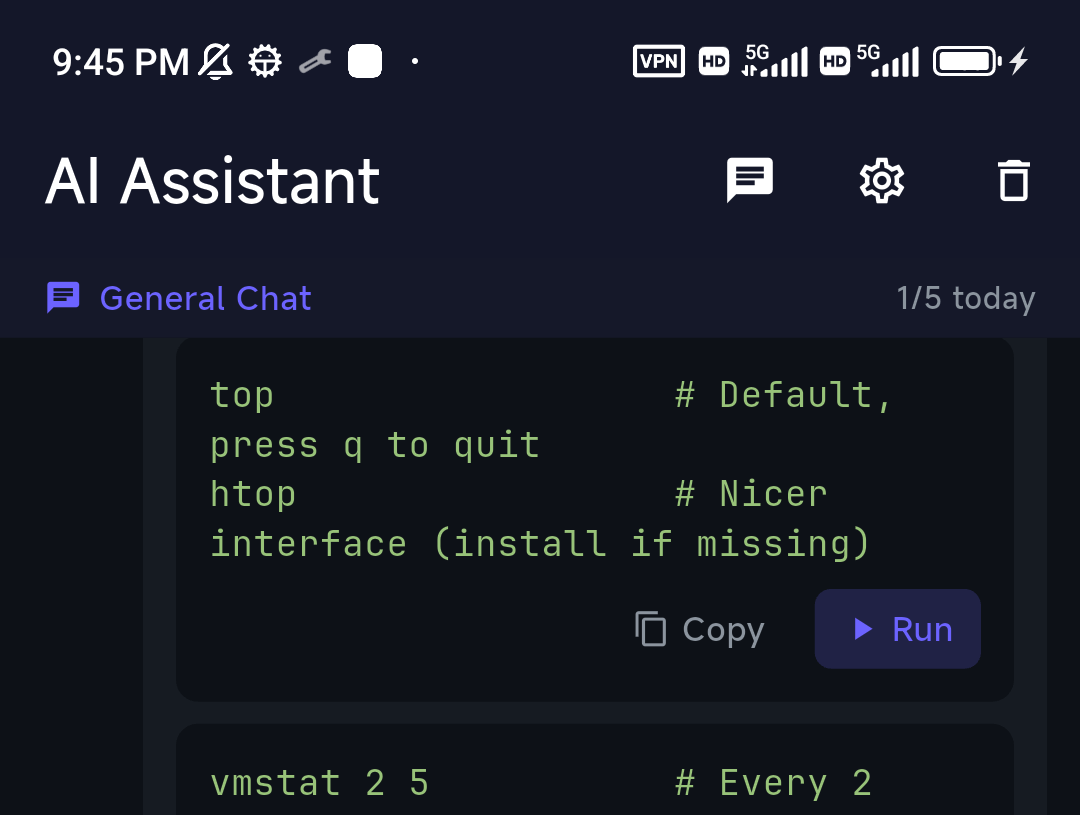
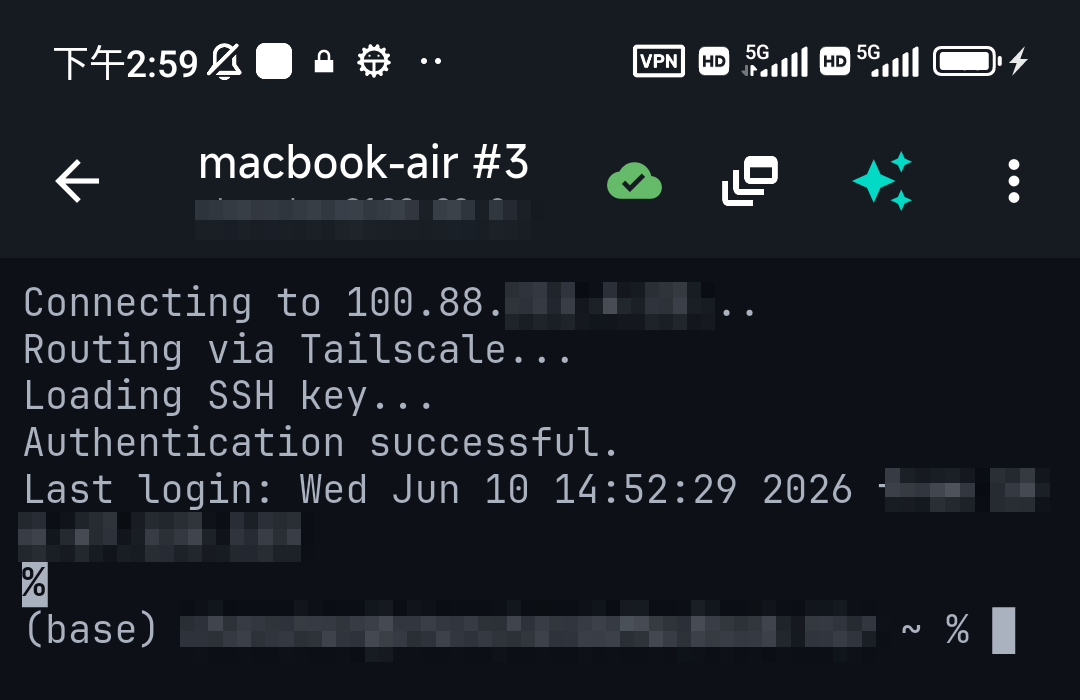
The practical pattern is not "replace my desktop terminal" — it's reach the desktop from the phone. SSH from TermAI into the same Mac or Linux box where you'd normally open Warp, and let the AI help you there. TermAI has Tailscale built in, so the target machine doesn't need to be exposed to the public internet.
Safety: what to check before you let one run commands
- Does it require approval? Assistant-style tools (Warp's suggestions, TermAI, iTerm2's generator) propose and wait. Agentic tools run loops — check the default approval mode before pointing one at a production box.
- What gets sent? Terminal scrollback often contains hostnames, IPs, tokens from a config you displayed. If that's unacceptable, that's the argument for a local model.
- Destructive-command guardrails.
rm -rf,dd,mkfs,chmod -R, force-pushes andDROP TABLEdeserve an explicit confirm step. Tools differ a lot here. - Sandbox and blast radius. Codex CLI's sandboxing, containers, or simply a repo under git are what make a bad step recoverable.
- Read before you run. A model that doesn't know your fstab will still write a confident
mountcommand. Details in can you trust AI shell suggestions?
How to pick
- Desktop daily driver with AI built in → Warp (Wave Terminal if you need open source and no account)
- AI that runs multi-step coding tasks → Claude Code for depth, Codex CLI for sandboxing, aider for git discipline
- No vendor lock-in on the model → aider, OpenCode or Goose with your own key
- Private, offline, or regulated → Ollama + a shell helper (or iTerm2 pointed at a local model)
- macOS, and you don't want AI in the binary by default → iTerm2, plugin installed only if you want it
- Server admin work, not coding → an assistant that explains and confirms beats an agent that acts — see AI for sysadmins
- AI in the terminal on a phone, over SSH → TermAI (nothing else on this list has a mobile app)
FAQ
What is the best AI terminal in 2026?
On a desktop, Warp is the leading AI terminal. For autonomous coding work, an agentic CLI — Claude Code for depth, Codex CLI for sandboxing, aider for git-native edits. For private/offline use, Ollama with a shell helper. On a phone over SSH, TermAI. They serve different places you work, and many people use two of them together.
Is there an AI terminal for mobile?
Yes — TermAI is a mobile SSH client with an AI assistant built into the terminal, on iOS and Android, with AI included on the free tier. Warp, Wave, iTerm2, Claude Code and Codex CLI are all desktop-only.
Does Warp have a phone app?
No. Warp runs on macOS, Linux and Windows. Its Remote Control feature publishes a running agent session to a link you can open in a mobile browser to watch and approve steps, but that monitors a desktop session — it isn't a terminal you can SSH from.
Is there a free AI terminal?
Several. Warp has a free tier with metered AI credits (150/mo for the first two months of a new account, then 75/mo) and supports your own API key on the free plan. Wave Terminal, aider, OpenCode, Goose and Codex CLI are free/open-source tools where you pay only for model usage. Ollama is free and local. TermAI's free tier includes 5 AI calls a day on mobile.
What is the best open-source AI terminal?
Wave Terminal (Apache-2.0) is the closest open-source equivalent to Warp. For agents, aider, OpenCode and Goose are open source, and Codex CLI is too. A fully open stack: Wave + aider + Ollama.
Can an AI terminal run commands by itself?
Agentic tools can, by design — that's the product. Assistant-style terminals like TermAI suggest a command and require you to tap Run, with an extra confirmation before destructive ones. Check the default approval mode of any agent before running it on a machine that matters.
What happened to Gemini CLI?
Google retired it on June 18, 2026 and replaced it with Antigravity CLI (the agy binary), a closed-source Go rewrite. The generous old free tier of 1,000 requests a day is gone; real use now expects a Google AI Pro/Ultra subscription, so verify current quotas before building anything around it.
Is an AI terminal the same as an AI SSH client?
No. An AI terminal is a local shell with a model attached. An AI SSH client manages saved hosts and keys, connects to remote servers, and puts the AI in that session — so its answers are grounded in the remote machine's state, not your laptop's. Warp is the former; TermAI is the latter.
Does an AI terminal work offline?
Only the local-model kind. Ollama-based setups (and iTerm2 or aider pointed at a local endpoint) work with no network. Everything hosted — Warp's AI, Claude Code, Codex CLI, Antigravity — needs a connection.
Is it safe to use an AI terminal on a production server?
With care. Prefer a tool that requires approval per command over one that runs autonomously, keep destructive-command confirmations on, assume whatever is on screen is sent to the model unless it's running locally, and read the command before you approve it.
Which AI terminal is best for sysadmins rather than developers?
Sysadmin work is usually one careful command at a time on a remote box, not a repo refactor — so an assistant that explains and confirms fits better than an autonomous agent. Warp on the desktop, TermAI on a phone, or a local Ollama helper where the output can't leave the machine.
Quick Facts
- AI terminal = a command line with an LLM that turns plain language into commands
- Desktop: Warp (free tier; Build $20/mo, Max $200/mo) · open-source: Wave Terminal
- Agentic coding: Claude Code (via Claude Pro $20 / Max $100–$200) · Codex CLI · aider · OpenCode · Goose
- Gemini CLI was retired June 18, 2026 → Antigravity CLI (
agy), closed source, much smaller free tier - Local/private: Ollama + a shell helper — offline, nothing sent anywhere
- Mobile (over SSH): TermAI on iOS + Android — AI on the free tier, grounded in the live server, confirm before destructive
- Pick by where you work: desktop, editor, remote server, or phone. Prices checked August 2026.
Free on iOS and Android. 5 AI requests/day on the free tier, plus unlimited SSH/SFTP and built-in Tailscale.